
The Best Order Flow Platform for Mac in 2026
Most order flow software is Windows-first desktop software, which is why Mac traders end up running Parallels. Here is what genuinely works on macOS in 2026, ranked by how much friction it costs.
The Best Order Flow Platform for Mac in 2026
The reason order flow platform for Mac is a search people make repeatedly is that the category grew up on Windows. Order flow tools came out of the futures world, the futures world ran on Windows workstations, and much of that software still assumes one. If you are on a MacBook your options are narrower than the review sites suggest — but they are better in 2026 than they have ever been, and one of them involves installing nothing at all.
Disclosure. We build NOROVIEW, so read this the way you would read any vendor's comparison page. What we can offer instead of neutrality is checkable numbers: every competitor figure below was taken from that vendor's own pricing page on 13 August 2026, not from a review site — the review sites disagreed with the vendors on nearly every number we checked. Where a competitor is better, it says so. If anything here is out of date, tell us and we will correct it.
The short version
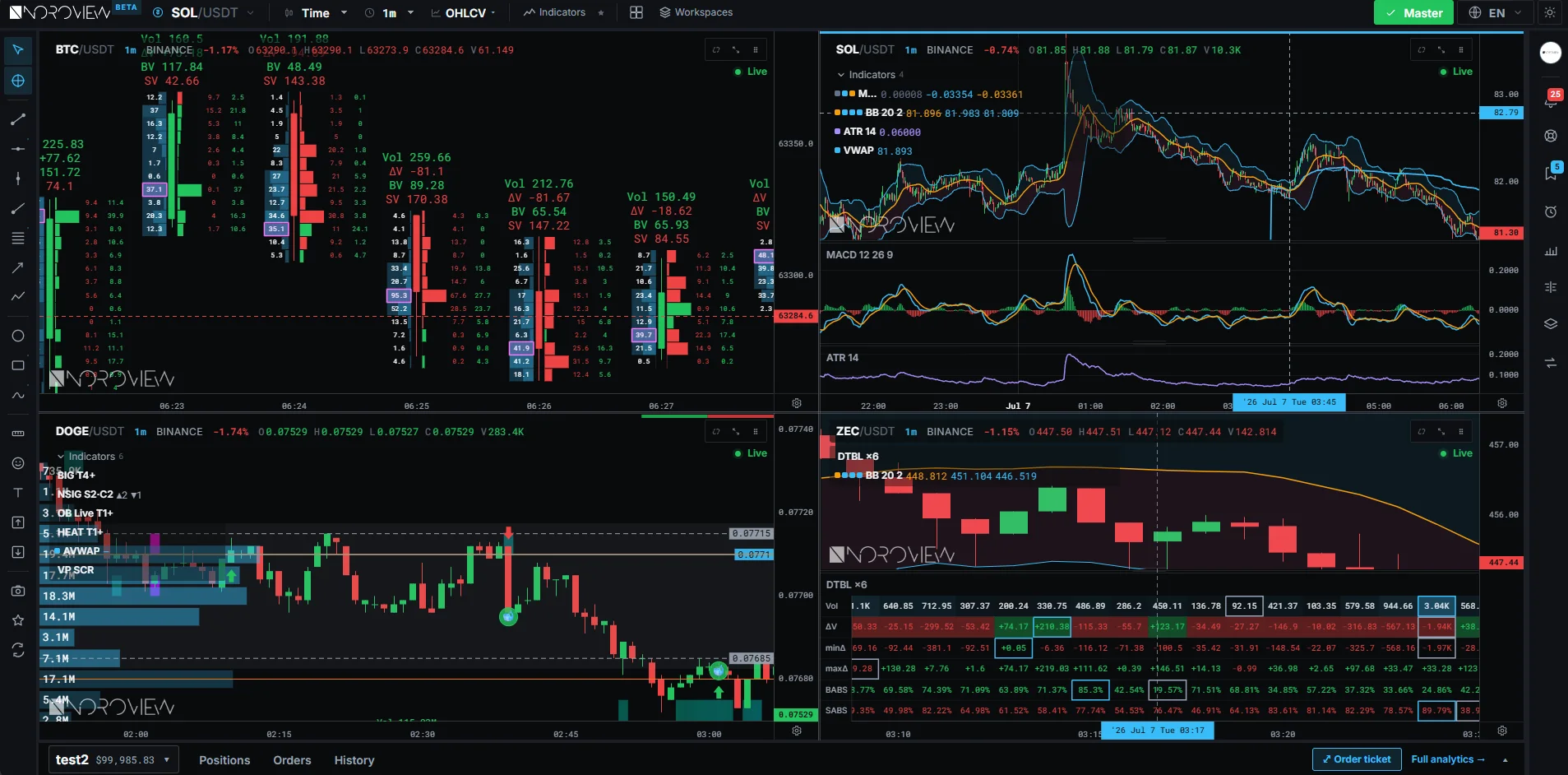
Best on a Mac, no compromise: a browser platform. NOROVIEW runs entirely in Safari, Chrome or Firefox with the Level 2 processing done server-side, so macOS is not a second-class target — it is the same target. TradingView is the other browser option, though its CME real-time data is a paid add-on.
Best desktop option that lists macOS: ATAS X, their next-generation client, is listed for Windows and macOS.
Everything else: check the vendor's current system requirements, and budget for Parallels or a Windows VM if the answer is Windows-only. That is a real cost in money, battery life and frustration.
Start free if you want to try it without a card: Open NOROVIEW free.
Why so much of this software is Windows-first
Order flow platforms have to consume a live order book — thousands of updates a second on a busy instrument — and render it without falling behind. Historically that meant a native application tuned for one operating system, and the customers were futures traders on Windows workstations. The ecosystem most of these platforms were built on made that choice easy and a macOS port expensive.
What changed is where the processing happens. If the order book is aggregated and processed on a server and the client only renders the result, the client can be a browser — and then the operating system stops mattering. That is the architecture NOROVIEW uses, and it is why a MacBook Air runs the same charts as a workstation.
It is also a genuine trade-off worth being straight about: a native client on a fast machine will always have a latency advantage over a browser talking to a server. For most discretionary traders that difference is invisible. For a latency-sensitive scalper on a fast tape, it is not nothing.
The options, ranked for a Mac user
1. Browser platforms — nothing to install
NOROVIEW. The free plan is real-time on Binance crypto with footprint charts and paper trading; $19/month adds real-time CME futures, the liquidity heatmap, the depth ledger and the NORO footprint. Runs in any modern browser on macOS, and the same account works on an iPad.
TradingView. Excellent general charting in a browser, with volume footprint on paid plans and market depth from Plus upwards. Real-time CME data is added to your account separately, so budget for that on top of the plan.
2. ATAS X — listed for Windows and macOS
ATAS's next-generation client is listed on their pricing page for Windows and macOS, which makes ATAS the most credible full-featured desktop option for Mac users who want its depth of tooling. Note that it is in beta, PLUS is €24.95/month, and real-time futures data needs PRO at €69.95/month.
3. Everything else — check, then budget for virtualisation
Bookmap, Sierra Chart and Quantower are desktop applications. Quantower's pricing page offers a Windows download; Sierra Chart's packages page does not state supported operating systems. We are not going to assert what does or does not run natively on a Mac today — check the vendor's current system requirements, because these change and a wrong claim here costs you a subscription.
If the answer is Windows-only, the practical routes are Parallels with a Windows licence, a cloud Windows VM, or a dedicated Windows machine. All three work. All three cost money and add a layer that breaks at inconvenient moments.
The Apple Silicon question
If you are on an M-series Mac, virtualisation is not the conversation it was on Intel. You are running Windows on ARM under Parallels, which works well for a great deal of software and less well for anything with unusual driver or performance requirements. Some trading platforms run fine; some are officially unsupported in that configuration.
This is precisely why browser-based tools have become the default answer for Mac traders. A browser on Apple Silicon is a first-class citizen and there is no compatibility question to research at all — worth something even if you have the patience for a VM.
What you can do on an iPad, while we are here
Almost none of this category runs on an iPad, because almost all of it is desktop software. A browser platform does — NOROVIEW's workspaces load in Safari on an iPad, and it makes a genuinely usable second screen for watching a level while you are away from the desk.
We would not recommend anyone trade from a tablet as their primary setup. But for watching a market you are already positioned in, or reading the tape from the sofa, it works — and it is a capability the desktop platforms structurally cannot offer.
What real-time US futures order flow actually costs
Software price is the number vendors advertise. For CME order flow it is rarely the number you pay, because on several platforms the market data is a separate line item. This is the comparison that matters, all-in:
| Platform | Software | Real-time futures data | All-in / month | Runs in |
|---|---|---|---|---|
| NOROVIEW Basic | $19 | Included | $19 | Browser |
| Exocharts Desktop Pro | $49 | dxFeed included | $49 + VAT | Desktop |
| Bookmap Global | $49 | + $34 BookmapData | $83 | Desktop |
| ATAS PRO | €69.95 | Included in PRO | €69.95 + VAT | Desktop |
| Quantower | $70 | Purchased separately | $70+ | Desktop |
| Sierra Chart | $36–$56 | Denali + exchange fees | $36+ and up | Desktop |
| TradingView Plus+ | Plan price | CME add-on, extra | Plan + add-on | Browser |
Two things are worth saying plainly about that table. Bookmap's advertised $49 is not the price of futures order flow — BookmapData futures is $34/mo on top, so the real figure is $83. And NOROVIEW and TradingView are the only two that run in a browser, but TradingView bills CME real-time data as a separate add-on. That is the whole argument for NOROVIEW in one row.
Where NOROVIEW is the wrong choice
NOROVIEW covers Binance only for crypto — Exocharts reaches five exchanges and Bookmap more than twenty. It is analysis only: no execution, no broker routing, so you trade through your own broker or exchange. Historical tick depth and replay do not go as deep as Exocharts' six years. And futures data on the free plan is last-closed-session history rather than a live feed — real-time CME starts at $19.
On the Mac question specifically: if you need Sierra Chart's scripting or Bookmap's historical replay depth, the right answer may genuinely be to run Windows in a VM rather than to pick a browser platform. Choosing tools by operating system is a real cost — we would rather you know that than pick us for the wrong reason.
Frequently asked questions
What is the best order flow platform for Mac?
A browser-based one, in most cases — NOROVIEW for order flow specifically, or TradingView for general charting with footprint on paid plans. ATAS X is listed for Windows and macOS if you want a desktop client with deeper tooling.
Does Bookmap work on Mac?
Bookmap is a desktop application — check their current system requirements, since this changes. If it is Windows-only for your setup, Parallels or a Windows VM is the usual route.
Can I run order flow software on a MacBook Air?
In a browser, yes, comfortably — the heavy order book processing happens server-side, so the laptop only renders. A native desktop platform under virtualisation on a MacBook Air is a much harder ask, particularly on battery.
Is there footprint chart software for Mac?
Yes. NOROVIEW's footprint charts run in the browser on macOS, with the standard footprint on the free plan. TradingView offers volume footprint on paid plans, also in the browser.
Do I need Parallels to trade order flow on a Mac?
Not any more. It was close to mandatory a few years ago; today browser platforms cover order flow properly and ATAS X lists macOS support. You would only need virtualisation for a specific Windows-only platform you have already decided you want.
Sources
Every figure above was read from the vendor's own page on 13 August 2026. Prices change — check before you subscribe.
- NOROVIEW — plans and features — https://noroview.com/pricing
- ATAS — pricing — https://atas.net/pricing/
- Quantower — prices and licenses — https://www.quantower.com/pricing
- Sierra Chart — service packages and pricing — https://www.sierrachart.com/index.php?page=doc%2FPackages.php
- TradingView — pricing — https://www.tradingview.com/pricing/
More comparisons in this series:
NOROVIEW vs Exocharts · NOROVIEW vs Bookmap · NOROVIEW vs ATAS · NOROVIEW vs Sierra Chart
Soroosh Moghimi — six years inside financial markets: algorithmic trading, HFT, crypto and AI, after a decade building startups. He publishes this material free because he already paid for the lessons in it. There is no paid course and no signal group. @sorooshmoghimi · About
See it on your own screen
The free plan is real-time on crypto, includes the footprint chart and paper trading, needs no card and does not expire. Real-time CME futures, the customizable NORO footprint, the liquidity heatmap and the low-latency feed start at $19/month.
Open NOROVIEW free → · Compare plans →
⚠️ DISCLAIMER — EDUCATIONAL CONTENT ONLY
This article is for educational and informational purposes only. It is not financial, investment, or trading advice, and nothing in it is a recommendation to buy, sell, or hold any asset. Trading cryptocurrencies and leveraged derivatives is high risk and can result in the loss of some or all of your capital. Only risk money you can afford to lose. Comparisons and prices reflect what each vendor published on 13 August 2026 and change without notice — always check the vendor's own pricing page before subscribing. Always do your own research. You alone are responsible for your decisions.
Keep reading
Related posts
The Best Footprint Chart Software in 2026
Six platforms that draw genuine footprint charts, compared on verified pricing — including which ones hide footprint behind a higher service package or a separately paid extension.
The Best Free Order Flow Software in 2026 (What Each Free Tier Really Gives You)
Four permanent free order flow tiers compared honestly — Bookmap Digital, ATAS Start, Exocharts free and NOROVIEW free — including the delays and limits each vendor words carefully.
The Best Level 2 Data Platform in 2026 (And What Level 2 Really Costs)
Where Level 2 market data actually comes from, why crypto depth is free and futures depth is not, what each platform charges, and how much depth you actually need.
The Best Order Flow Trading Platform in 2026 (Tested and Priced)
Six order flow platforms compared on pricing verified from each vendor's own page: Exocharts, Bookmap, ATAS, Quantower, Sierra Chart and NOROVIEW — with the real all-in cost of real-time CME data.
NOROVIEW vs TradingView for Order Flow: What TradingView Can't Show You
NOROVIEW vs TradingView for order flow trading: why most TradingView order flow indicators approximate delta from candle data, what real Level 2 requires, and what CME real-time data costs on each.
NOROVIEW vs Sierra Chart: Numbers Bars, Packages and Data Fees
NOROVIEW vs Sierra Chart compared: which service package unlocks Numbers Bars and market depth, what the Denali feed and exchange fees add, and when a browser platform is the better answer.
Discussion (0)
Want to join the discussion? Comments live inside the platform.
Open NOROVIEW